WhatsApp Not Working? Here's Why & How to Fix It
Apr 28, 2026

TL;DR
If WhatsApp has stopped working, the most likely reason is:
Server down
Poor internet connection
Versions of the app that are out of date
Problems with app cache
Begin by checking whether WhatsApp isn't working in Downdetector.
After restarting the application, check your Internet connection and clean the cache.
If you're experiencing issues with WhatsApp, such as it stopping work, failing to send messages, not launching, or crashing repeatedly, don't worry, you're not the only one. The good news is that these issues are simple and easy to fix.
This guide will help you understand the root cause of the issue that why whatsapp not working and show you the steps to resolve it.
Why Is WhatsApp Not Working? (Common Causes)
Below are the most frequent motives behind WhatsApp problems:
-
Weak or no internet connection (Wi-Fi or mobile data)
-
WhatsApp server down
-
Old version of the app
-
Corrupted or overloaded cache
-
Storage for low-end phones
-
App requires a reboot (force to stop)
-
Old phone software
-
Account blocked or banned
-
Incorrect date & time settings
-
VPN interferes with the connection
Many of them are straightforward to repair; all you need to do is find the problem. We'll now look at the steps to address each issue according to your device.
Quick Troubleshooting Flow (Start Here)
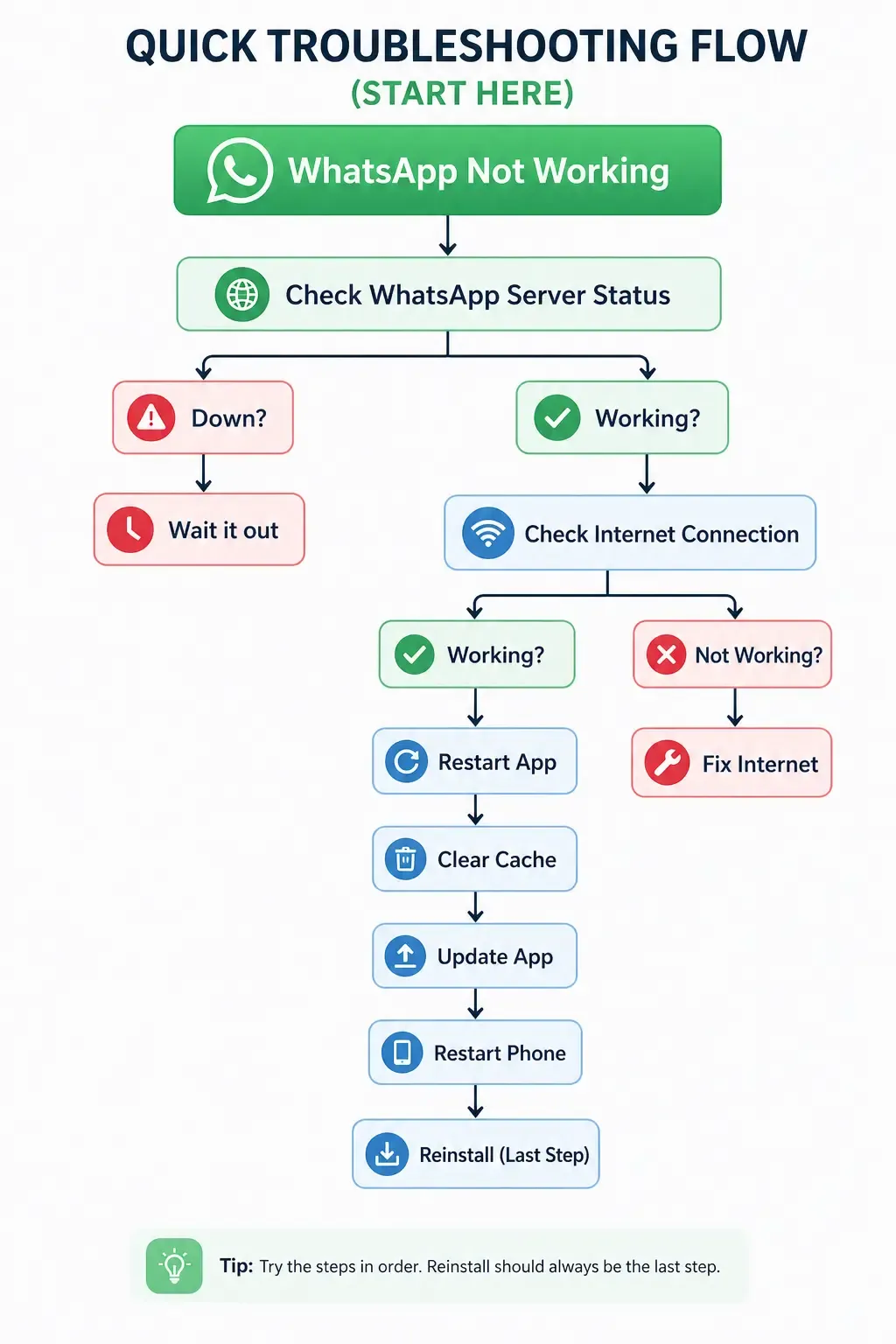
Is WhatsApp Down Right Now?
Before you attempt anything technical, be sure to determine whether the problem is on WhatsApp's end.
Click here: https://downdetector.com/status/whatsapp/
If you notice a massive rise in your reports, it signifies that many users are experiencing similar issues. This is due to a server issue.
If this is the case, you can't fix anything. You just have to be patient.
The good news is that WhatsApp problems are very rare and are usually fixed quickly.
How to Fix WhatsApp Not Working on Android
The majority of users are experiencing issues, so let's go through them step by step.
Fix 1: Check Your Internet Connection
-
Turn ON the airplane mode for 10 seconds, then switch it off
-
Switch between mobile and Wi-Fi data
-
Use YouTube or Google to try the connection
If any other app doesn't work, it’s your internet, not WhatsApp.
Fix 2: Force Stop WhatsApp
-
Go to Settings > Apps > WhatsApp
-
Tap Force Stop
-
Reopen the app
The app is reset instantaneously and resolves many issues.
Fix 3: Clear WhatsApp Cache
-
Go to Settings > Apps > WhatsApp > Storage
-
Tap Clear Cache
Do not tap Clear Data as it can erase your chats.
The build-up of caches is among the main causes WhatsApp stops responding.
Fix 4: Update WhatsApp
-
Open Google Play Store
-
Search WhatsApp
-
Tap Update (if there is one)
Updates address glitches, crashes and compatibility problems.
Fix 5: Restart Your Phone
-
Press the power button
-
Tap Restart
It's simple, yet surprisingly useful.
Fix 6: Free Up Storage Space
WhatsApp requires space to work effectively.
-
Go to Settings > Storage
-
Remove files that are not needed
-
Try to get at minimum 1GB of available space
Low storage = app crashes + messages not sending.
Fix 7: Check Date & Time Settings
-
Go to Settings > General Management > Date & Time
-
Auto-date and time
Incorrect settings may cause WhatsApp to lose connection with servers.
Fix 8: Reinstall WhatsApp (Last Resort)
Before this:
-
Go to WhatsApp > Settings > Chats > Chat Backup
Then:
-
Uninstall WhatsApp
-
Install from the Play Store
This fixes the app's deep issues.
How to Fix WhatsApp Not Working on iPhone
If you're running an iPhone, here's how you can do:
Fix 1: Check Internet & Toggle Airplane Mode
-
Go to Settings > Airplane Mode
-
Then turn it on - then wait for 10 seconds before turning it off
Fix 2: Force Quit & Reopen
-
Swipe up from the bottom
-
Swipe WhatsApp to the side
-
Reopen the app
Fix 3: Update WhatsApp
-
Open App Store
-
Make sure to tap the profile you want to view
-
Update WhatsApp
Fix 4: Check Permissions
-
Go to Settings > WhatsApp
-
Enable:
-
Cellular Data
-
Notifications
-
Background App Refresh
Fix 5: Reinstall WhatsApp
-
Chat with the backup chat first.
-
Long-press app - delete
-
Reinstall the app from the App Store
How to Fix If WhatsApp Web Is Not Working
If WhatsApp Web isn't loading or isn't syncing:
-
Verify that your cell phone is online and connected
-
Refresh the tab in your browser
-
You can try a different web browser (Chrome works the best)
-
Clear caches and cookies from your browser
-
Scan the QR code again:
-
Open WhatsApp - Linked Devices
Be aware: WhatsApp Web depends on the connection to your mobile.
When Nothing Works - Contact WhatsApp Support
If you've tried everything but WhatsApp doesn't work, don’t quit. The first step is to call WhatsApp Support:
-
In-app:
Settings > Help > Contact Us -
You can also visit:
https://faq.whatsapp.com/
If you have been banned or restricted, you may submit an appeal via the support channel and ask for an investigation.
Most of the time, the issues can be solved using these steps, so you're just one or two steps away from returning to normal.
Conclusion
Is WhatsApp not working? Don't worry about it; the majority of problems are easy to fix. Start by checking if there’s a server outage, then switch to an internet connection, clear your cache in the app, move to the latest version of WhatsApp, and then restart it if needed.
The steps listed above can solve nearly every frequent issue within just a few minutes.
When your WhatsApp is operational, take a look at the ways WhatsApp Business can assist you in reaching out to customers in a more professional manner. Also, try WAWCD's WhatsApp Business page for more information.
Frequently Asked Questions (FAQs)
Why is my WhatsApp not working today?.
WhatsApp could stop functioning due to a server issue, a weak internet connection or even a temporary app issue. First, check out the reports of outages through Downdetector to see if others are facing the same issue. If yes, it's probably an issue with the server and should be resolved shortly.
How do I fix WhatsApp when it stops working?
Begin by following these easy steps:
-
Make sure your Internet is connected.
-
Force stop and then reopen the application
-
Clear cache (Android)
-
Update WhatsApp
The basic solutions resolve the majority of issues in a matter of minutes.
Is WhatsApp down right now?
For verification, check Downdetector or check updates from the official WhatsApp channels.
If you notice a rise in complaints, the problem could be on WhatsApp's side.
Why is WhatsApp not working on Android?
Common causes include:
-
Cache buildup is slowing the app
-
Outdated app version
-
Low storage space
Cleaning caches and updating the app often will fix the problem.
Why won’t WhatsApp open on my iPhone?
This can happen due to:
-
Disabled permissions (like data or notifications)
-
Outdated iOS or app version
-
Temporary app glitch
Try force-quitting the app and updating it from the App Store.
How do I restart WhatsApp?
-
Android: Go to Settings → Apps → WhatsApp → Tap Force Stop
-
iPhone: Swipe up, close WhatsApp, and then reopen it
This refreshes the app and fixes minor bugs.
Why is WhatsApp not working on Wi-Fi?
The Wi-Fi connection may be active, but it isn't able to provide internet access, or WhatsApp may not have permission to use it. Switch to mobile data to try it out, or reboot your router.
What should I do if WhatsApp keeps crashing?
You can try these:
-
Clear cache (Android)
-
Update the app
-
Make storage space
-
Restart your smartphone
If you are still having issues, reinstall WhatsApp after backing up your chats.
The Wi-Fi connection may be active, but it isn't able to provide internet access, or WhatsApp may not have permission to use it. Switch to mobile data to try it out, or reboot your router.
What should I do if WhatsApp keeps crashing?
You can try these:
-
Clear cache (Android)
-
Update the app
-
Make storage space
-
Restart your smartphone
If you are still having issues, reinstall WhatsApp after backing up your chats.
About the author

Tamkeen Arshad
Marketing Specialist
She crafts compelling content that tells stories, sparks interest, and drives engagement. With a blend of creativity and strategy, she turns ideas into impactful words that deliver results.
You might also like these


WAWCD
AIWAWCD, 91 Donegall Avenue, Belfast, Northern Ireland, BT12 6LS




Copyright © 2026 WAWCD LLC. All rights reserved. Powered by Spadasoft.